




UI/UX Training
The UI/UX Training Program is a comprehensive, hands-on course designed to teach participants the essential skills required to design user-friendly and visually appealing digital experiences. It covers key topics such as user research, wireframing, prototyping, interaction design, visual design principles, and usability testing. Participants will learn to create intuitive user interfaces and enhance user experiences using design tools like Figma, Adobe XD, Sketch, and InVision.
Why Choose Skillairo?
Expert Mentor
Industry Exposure
LMS Access
Talk & Skills
Professional Certificate
Career Support
Programs Overview
The UI/UX Training Program is a comprehensive, hands-on course designed to teach participants the essential skills required to design user-friendly and visually appealing digital experiences. It covers key topics such as user research, wireframing, prototyping, interaction design, visual design principles, and usability testing. Participants will learn to create intuitive user interfaces and enhance user experiences using design tools like Figma, Adobe XD, Sketch, and InVision.
Ideal for aspiring UI/UX designers, graphic designers, and product developers, this program offers flexible learning options, expert mentorship, and an industry-recognized certification. By the end of the course, participants will be equipped to design seamless user interfaces, optimize user experiences, and contribute to the development of innovative digital products.
Training Path
Introduction to UI/UX design
What is UI/UX Design?
- Difference Between UI (User Interface) and UX (User Experience)
- The Role of a UI/UX Designer in Product Development
- Overview of Design Processes
User Research and Personas
- Understanding User-Centered Design (UCD)
- Conducting User Research
- Creating User Personas and Empathy Maps
- Understanding User Behavior through Journey Mapping
Interaction Design and Usability
- Principles of Interaction Design
- Designing for Usability
- Micro-Interactions and Motion Design in UI
- Usability Testing
Mobile and Responsive Design
- Basics of Mobile-First Design and Responsive Web Design
- Designing for Different Screen Sizes and Breakpoints
- Optimizing Touch Interactions for Mobile Devices
- Best Practices for Designing Native and Cross-Platform Apps
Understanding Design Principles
- Fundamental Design Principles
- Visual Hierarchy and Typography in UI/UX Design
- Color Theory and its Application in UI Design
- Creating Consistency with Design Systems and Style Guides
Wireframing and Prototyping
- Introduction to Wireframes
- Tools for Wireframing
- Creating Interactive Prototypes for User Testing
- Best Practices for Prototyping
UI/UX Tools and Design Software
- Overview of Popular UI/UX Design Tools
- Introduction to Design Collaboration Tools
- Using Design Plugins and Libraries for Efficiency
- Best Practices for Version Control and Collaboration in Design
UX Writing and Accessibility
- The Role of UX Writing
- Designing for Accessibility
- Tools for Accessibility Testing
- Localization and Internationalization in UI/UX Design
Skills Covered
- UX Design
- UI Design
- Prototyping
- User-centered design
- Persona mapping
- Empathy mapping
- Heuristics Evaluation
- Microinteractions
- Augmented Reality
- Virtual Reality
- Rapid Prototyping
- Iconography
Industry Projects
E-commerce Website
Build an online shopping platform with product listings, user authentication, payment gateways, and order management. Focus on a smooth user experience and backend inventory management.
Blog Platform
Create a platform for users to write and publish blog posts, with features like user profiles, commenting, content management, and social sharing. Implement a simple, intuitive interface for authors and readers.
Event Management System
Develop a system for organizing, promoting, and managing events. Include features such as event registration, ticketing, calendar integration, attendee management, and event notifications.
Social Media Platform
Build a platform that allows users to create profiles, post content, follow others, like and comment on posts, and engage in direct messaging. Focus on real-time interactions and scalability.
Restaurant Reservation System
Develop a system that allows customers to book tables, view menus, make reservations, and get notifications. Implement an admin panel for managing bookings and customer details.

Redesign the user interface of an existing mobile app to enhance usability, improve aesthetics, and provide a more intuitive experience. Focus on simplifying navigation, optimizing layout, and ensuring consistency across screens. The key component include
1.User Research and Feedback Analysis Conduct user interviews, surveys, and usability testing to identify pain points, preferences, and improvement opportunities.
2.UI/UX Redesign Implement a modern and consistent UI/UX design based on industry standards, incorporating features like improved navigation, responsive design, and accessibility.
3.Feature Optimization Refine and prioritize existing features to ensure relevance and usability while introducing new functionalities as per user feedback.
4.Improved Navigation Flow Simplify the app’s navigation structure, reduce the number of clicks needed to complete tasks, and make it more intuitive.
5.Performance Enhancement Optimize the app’s speed, reduce loading times, and improve responsiveness across devices and operating systems.
6.Accessibility Improvements Ensure the app complies with accessibility standards (e.g., WCAG) by providing features like text resizing, screen reader compatibility, and color contrast adjustments.
7.Cross-Platform Compatibility Redesign the app to provide a consistent user experience across iOS and Android platforms, considering their unique design guidelines (Material Design for Android and Human Interface Guidelines for iOS).
8.Integration of Analytics Embed analytics tools to track user interactions, monitor feature usage, and gather data for continuous improvements.
Technologies Figma/Adobe XD (UI/UX design), Flutter/React Native (cross-platform development), Firebase Analytics, Google Lighthouse (performance testing), WCAG compliance tools, and GitHub/GitLab for version control.
Outcome A redesigned mobile application that improves usability, accessibility, and overall user satisfaction. The app will offer a seamless experience, better performance, and an updated look that aligns with modern design trends, ultimately increasing user engagement and retention.
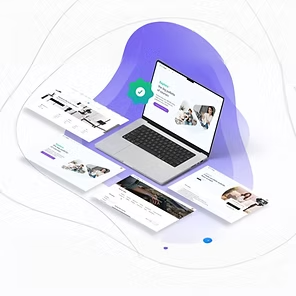
Design a user-friendly and visually appealing interface for an online learning platform. Focus on easy program navigation, interactive content, user engagement features (quizzes, discussions), and progress tracking. The key component include
1.User Registration and Profile Management Enable students, instructors, and administrators to register, create profiles, and manage their account details securely.
2.Course Catalog and Search Provide a searchable and filterable course catalog, allowing users to explore courses based on categories, difficulty levels, and instructors.
3.Interactive Learning Modules Deliver course content through interactive video lectures, quizzes, assignments, and downloadable materials.
4.Live Classes and Webinars Support real-time learning through live streaming, webinars, and virtual classroom integration with tools like Zoom or Microsoft Teams.
5.Progress Tracking and Analytics Allow users to track their course progress, view completion rates, and access performance analytics.
6.Discussion Forums and Collaboration Foster community engagement through discussion forums, group chats, and peer-to-peer collaboration features.
7.Certification and Badges Generate digital certificates and badges upon course completion to recognize achievements and encourage learning.
8.Multi-Language Support Provide courses and platform navigation in multiple languages to cater to a global audience.
9.Admin Panel and Content Management Offer administrators tools to manage users, monitor platform activity, and update course content effortlessly.
Technologies React.js/Angular (front-end), Node.js/Django (back-end), MySQL/PostgreSQL (database), AWS/GCP (cloud hosting), WebRTC (live streaming), Figma/Adobe XD (UI/UX design), and Stripe/PayPal (payment gateway integration).
Outcome A fully functional e-learning platform that offers a personalized, engaging, and scalable learning experience. It enhances knowledge sharing, improves accessibility, and provides valuable analytics for both learners and educators.

Create an intuitive and engaging UI for a food delivery app. Include features such as menu browsing, real-time order tracking, payment options, and easy navigation for users to place orders quickly. The key component include
1.User Registration and Profile Management Enable users to sign up, log in, and manage their profiles, including saved addresses and payment methods.
2.Restaurant Search and Filtering Allow users to search for restaurants based on location, cuisine type, ratings, and price range, with advanced filters for dietary preferences.
3.Menu Display and Order Customization Display restaurant menus with detailed item descriptions, images, and prices. Provide options for customization, such as ingredient preferences or portion sizes.
4.Real-Time Order Tracking Enable users to track their orders in real-time, from preparation to delivery, using GPS-enabled tracking.
5.Secure Payment Integration Offer multiple payment options, including credit/debit cards, digital wallets, and cash on delivery, with secure payment gateways.
6.Push Notifications Notify users about order updates, exclusive offers, and promotional discounts to enhance engagement.
7.Rating and Review System Allow users to rate restaurants, delivery experiences, and individual menu items, along with writing reviews.
8.Admin Dashboard Provide restaurant owners and app administrators with a dashboard to manage menus, track orders, and monitor overall performance.
9.Delivery Partner Module Include a dedicated module for delivery personnel to view and manage assigned orders, track routes, and update delivery statuses.
10.Personalized Recommendations Use machine learning to suggest restaurants or dishes based on user preferences, order history, and trending cuisines.
Technologies Flutter/React Native (mobile app), Node.js/Express (back-end), MongoDB/PostgreSQL (database), Firebase (real-time notifications), Google Maps API (GPS tracking), Stripe/Razorpay (payment gateway), and AWS/GCP (cloud hosting).
Outcome A user-friendly food delivery application that bridges the gap between customers and restaurants. The platform enhances convenience, improves customer satisfaction, and provides restaurant owners with valuable insights to optimize their services.
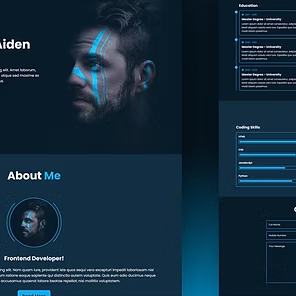
Create a sleek and modern portfolio website for a designer, showcasing their work with an emphasis on clean design, smooth navigation, and visual storytelling. Include sections for projects, skills, and contact information. The key component include
1.Personalized Home Page Design an engaging home page with an introduction, designer’s profile, and a captivating banner to create a strong first impression.
2.Portfolio Showcase Display the designer’s work using visually rich galleries or grids, categorized by project type (e.g., graphic design, UX/UI, branding).
3.Skills and Services Section Highlight the designer’s skills, areas of expertise, and services offered with a clean and structured layout.
4.Project Details Page Provide detailed descriptions for each project, including objectives, design process, tools used, and outcomes, along with high-quality images or videos.
5.Responsive Design Ensure the website is fully responsive and optimized for different screen sizes and devices.
6.Contact Form and Integration Include an easy-to-use contact form for inquiries, integrated with email notifications. Optionally, link to professional social media accounts like LinkedIn or Behance.
7.Testimonials Section Feature testimonials from clients or collaborators to build credibility and trust.
8.Blog or Insights Section Provide a platform for sharing design insights, case studies, or tutorials to engage visitors and improve SEO.
9.SEO Optimization Implement SEO best practices, including meta tags, alt text for images, and optimized loading speed, to enhance discoverability.
10.Analytics Integration Integrate tools like Google Analytics to track visitor behavior, engagement metrics, and traffic sources.
Technologies HTML, CSS, JavaScript, React.js/Vue.js (front-end), Node.js/Express (back-end, if required), MongoDB/PostgreSQL (database, if dynamic content is included), Firebase (hosting, optional), and Google Analytics.
Outcome A modern and visually striking portfolio website that effectively showcases the designer’s work and capabilities. The platform helps attract clients, enhance professional visibility, and establish a strong personal brand online.

Design a travel booking platform that provides an easy way to search for flights, hotels, and activities. Focus on clear filters, smooth booking flows, and visually appealing results to enhance user experience and decision-making. The key component include
1.Search and Filtering Options Enable users to search for travel services like flights, hotels, and packages. Provide advanced filters such as price range, travel dates, destination, and customer reviews to refine search results.
2.Real-Time Availability Integrate APIs to display real-time availability of flights, hotel rooms, and tour packages along with dynamic pricing updates.
3.Booking and Payment System Allow users to book travel services directly through the platform and provide multiple secure payment options (e.g., credit/debit cards, digital wallets, net banking).
4.User Accounts and Profiles Create user accounts where customers can save their preferences, booking history, and wishlists for future reference.
5.Reviews and Ratings Include a feature for users to leave reviews and ratings for hotels, flights, and packages, helping others make informed decisions.
6.Travel Recommendations Offer personalized travel recommendations based on user preferences, booking history, and popular destinations.
7.Multi-Language and Currency Support Provide multi-language options and support for various currencies to cater to a global audience.
8.Itinerary Management Enable users to manage and view their travel itineraries, including flight times, hotel check-in/check-out dates, and activity schedules.
9.Notifications and Alerts Send updates regarding booking confirmations, reminders, discounts, and promotions via email or push notifications.
10.Admin Dashboard Provide an admin panel for platform operators to manage bookings, add or update listings, view analytics, and monitor system performance.
Technologies React.js/Angular (front-end), Node.js/Django (back-end), MongoDB/PostgreSQL (database), Stripe/PayPal API (payment gateway), Amadeus API/Skyscanner API (travel services integration), AWS (hosting), and Firebase (notifications).
Outcome A comprehensive travel booking platform that simplifies travel planning and booking processes while offering a seamless user experience. The platform helps businesses expand their reach and enables users to find the best travel deals efficiently.
Certifications
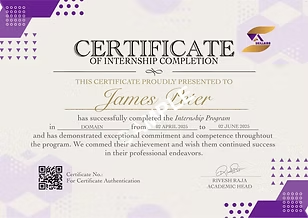
Get certified in UI/UX design through our program and receive both a Training Completion Certificate and an Internship Completion Certificate. The prestigious Top Performer Certificate is awarded to outstanding students who performed exceptionally well during both the training and internship phases.


Pricing Plan
At SkillAiro, we’re committed to making high-quality education accessible to all. We’ve structured our programs with transparent and competitive pricing to suit a variety of learning needs.
UI/UX Industry Trends
These trends underscore India’s expanding role in the global UI/UX landscape, supported by a robust IT industry and a growing pool of skilled professionals.
35% Annual Growth Rate

The UI/UX design industry in India is witnessing rapid expansion, growing at an impressive annual rate of 35%. This growth is fueled by the increasing digitalization of sectors such as e-commerce, fintech, healthcare, and education. Valued at around ₹18,000 crore in 2024, the industry offers strong career prospects for professionals at all levels.
Specifically, the mobile UX design services market in India is anticipated to grow at a CAGR of 8.9% from 2025 to 2035, driven by increasing mobile penetration and digital inclusion initiatives.
Other Key Industry Trends
- The Indian UI/UX design industry is projected to reach USD 18.5 billion by 2024, highlighting substantial growth fueled by the nation’s expanding digital economy and startup ecosystem.
- Globally, the UI/UX design software market is expected to grow from USD 1.8 billion in 2023 to USD 6.5 billion by 2032, exhibiting a compound annual growth rate (CAGR) of 15.3% during the forecast period.
- UI/UX design plays a pivotal role in the e-commerce sector, with projections indicating a potential 50% growth attributed to enhanced user experiences.
In India, UI/UX Valued at around ₹18,000 crore in 2024, the industry offers strong career prospects for professionals at all levels.
Entry-level designers can earn between ₹4.5 to ₹9 lakh per year, while those with a few years of experience can see salaries ranging from ₹7 to ₹14 lakh. Senior professionals, especially in top tech firms, can command salaries as high as ₹35 lakh annually.
INR 4.5-35 L Annual Salary

Student Testimonial

At SkillAiro, we’re committed to making high-quality education accessible to all. We’ve structured our programs with transparent and competitive pricing to suit a variety of learning needs.
Anamika ,
Web Developer
At SkillAiro, we’re committed to making high-quality education accessible to all. We’ve structured our programs with transparent and competitive pricing to suit a variety of learning needs.
Anamika ,
Web Developer
At SkillAiro, we’re committed to making high-quality education accessible to all. We’ve structured our programs with transparent and competitive pricing to suit a variety of learning needs.
Anamika ,
Web Developer
At SkillAiro, we’re committed to making high-quality education accessible to all. We’ve structured our programs with transparent and competitive pricing to suit a variety of learning needs.
Anamika ,
Web Developer
At SkillAiro, we’re committed to making high-quality education accessible to all. We’ve structured our programs with transparent and competitive pricing to suit a variety of learning needs.
Anamika ,
Web Developer
Our Alumni Work At
Our alumni are already pushing boundaries in their fields. Former students are excelling in high-profile industries and influencing the landscape of tomorrow.
RECOGNITION FROM



Frequently Asked Questions
What is a UI/UX design?
A UI/UX Design program equips individuals with the skills and knowledge required to create user-friendly, visually appealing interfaces and enhance user experiences. It typically covers topics such as user research, wireframing, prototyping, interaction design, usability testing, and tools like Figma, Adobe XD, or Sketch. The program often includes hands-on projects and case studies, preparing learners for careers as UI Designers, UX Designers, or Product Designers.
What does a UI/UX designer do?
A UI/UX Designer focuses on designing and improving digital products to ensure they are functional, aesthetically pleasing, and user-friendly. UI Designers create visually appealing interfaces, while UX Designers focus on user research, usability testing, and optimizing user journeys. They collaborate with developers, product managers, and stakeholders to deliver engaging and effective designs. Our UI/UX design training program provides the expertise and practical experience needed to excel in this field.
Who are the instructors for this UI/UX program, and how are they selected?
Our UI/UX design trainers are highly skilled professionals with extensive experience in user interface design, user experience strategies, and interactive design principles. They specialize in creating intuitive, visually appealing, and user-centered designs for web and mobile applications. With a focus on industry-relevant tools and techniques, our trainers bring practical knowledge from real-world projects to the classroom. We ensure that only trainers with outstanding alumni feedback and a strong portfolio of successful design projects remain part of our faculty, providing students with the best learning experience in UI/UX design.
What will be the career path after completing the UI/UX program online?
After completing an online UI/UX design program, career paths include roles such as UI Designer, UX Designer, Interaction Designer, Product Designer, or Visual Designer. With experience, you can progress to senior roles like Lead UX Designer, Design Manager, or UX Strategist. Opportunities are abundant in industries like technology, e-commerce, gaming, healthcare, and digital marketing.
Which industries use UI/UX the most?
UI/UX design is widely used across industries such as technology, e-commerce, gaming, healthcare, education, and finance. Companies in entertainment, telecommunications, and SaaS also rely heavily on UI/UX designers to create user-friendly digital products. This UI/UX design certification program is ideal for individuals looking to build a career in these high-demand sectors.
Can I pay the fee in installments?
Yes, you can secure your spot by paying a pre-registration fee of 1000 INR. The remaining balance can be paid before the program begins.
Will I get an internship?
Yes, at Skillairo, we offer guaranteed internship opportunities for all students across all our courses, providing hands-on experience to enhance their learning and career prospects.
How long is the training?
Our Self-paced and Mentor-led training program both last for a period of 2-3 months. Our Advanced training program last for a period of 4 months.
Talk to Expert
At Skillairo, we help students and aspiring professionals gain industry-ready skills through expert-led training, hands-on projects, internships, and career guidance.